# M2Dev Client Source
[](https://github.com/d1str4ught/m2dev-client-src/actions/workflows/main.yml)
This repository contains the source code necessary to compile the game client executable.
## How to build (short version)
> cmake -S . -B build
>
> cmake --build build
**For more installation/configuration, check out the [instructions](#installationconfiguration) below.**
---
## 📋 Changelog
### Encryption & Security Overhaul
The entire legacy encryption system has been replaced with [libsodium](https://doc.libsodium.org/).
#### Removed Legacy Crypto
* **Crypto++ (cryptopp) vendor library** — Completely removed from the project
* **Panama cipher** (`CFilterEncoder`, `CFilterDecoder`) — Removed from `NetStream`
* **TEA encryption** (`tea.h`, `tea.cpp`) — Removed from both client and server
* **DH2 key exchange** (`cipher.h`, `cipher.cpp`) — Removed from `EterBase`
* **Camellia cipher** — Removed all references
* **`_IMPROVED_PACKET_ENCRYPTION_`** — Entire system removed (XTEA key scheduling, sequence encryption, key agreement)
* **`adwClientKey[4]`** — Removed from all packet structs (`TPacketCGLogin2`, `TPacketCGLogin3`, `TPacketGDAuthLogin`, `TPacketGDLoginByKey`, `TPacketLoginOnSetup`) and all associated code on both client and server
* **`LSS_SECURITY_KEY`** — Dead code removed (`"testtesttesttest"` hardcoded key, `GetSecurityKey()` function)
#### New Encryption System (libsodium)
* **X25519 key exchange** — `SecureCipher` class handles keypair generation and session key derivation via `crypto_kx_client_session_keys` / `crypto_kx_server_session_keys`
* **XChaCha20-Poly1305 AEAD** — Used for authenticated encryption of handshake tokens (key exchange, session tokens)
* **XChaCha20 stream cipher** — Used for in-place network buffer encryption via `EncryptInPlace()` / `DecryptInPlace()` (zero overhead, nonce-counter based replay prevention)
* **Challenge-response authentication** — HMAC-based (`crypto_auth`) verification during key exchange to prove shared secret derivation
* **New handshake protocol** — `HEADER_GC_KEY_CHALLENGE` / `HEADER_CG_KEY_RESPONSE` / `HEADER_GC_KEY_COMPLETE` packet flow for secure session establishment
#### Network Encryption Pipeline
* **Client send path** — Data is encrypted at queue time in `CNetworkStream::Send()` (prevents double-encryption on partial TCP sends)
* **Client receive path** — Data is decrypted immediately after `recv()` in `__RecvInternalBuffer()`, before being committed to the buffer
* **Server send path** — Data is encrypted in `DESC::Packet()` via `EncryptInPlace()` after encoding to the output buffer
* **Server receive path** — Newly received bytes are decrypted in `DESC::ProcessInput()` via `DecryptInPlace()` before buffer commit
#### Login Security Hardening
* **Removed plaintext login path** — `HEADER_CG_LOGIN` (direct password to game server) has been removed. All game server logins now require a login key obtained through the auth server (`HEADER_CG_LOGIN2` / `LoginByKey`)
* **CSPRNG login keys** — `CreateLoginKey()` now uses `randombytes_uniform()` (libsodium) instead of the non-cryptographic Xoshiro128PlusPlus PRNG
* **Single-use login keys** — Keys are consumed (removed from the map) immediately after successful authentication
* **Shorter key expiry** — Expired login keys are cleaned up after 15 seconds (down from 60 seconds). Orphaned keys (descriptor gone, never expired) are also cleaned up
* **Login rate limiting** — Per-IP tracking of failed login attempts. After 5 failures within 60 seconds, the IP is blocked with a `BLOCK` status and disconnected. Counter resets after cooldown or successful login
* **Removed Brazil password bypass** — The `LC_IsBrazil()` block that unconditionally disabled password verification has been removed
#### Pack File Encryption
* **libsodium-based pack encryption** — `PackLib` now uses XChaCha20-Poly1305 for pack file encryption, replacing the legacy Camellia/XTEA system
* **Secure key derivation** — Pack encryption keys are derived using `crypto_pwhash` (Argon2id)
---
# Installation/Configuration
This is the third part of the entire project and it's about the client binary, the executable of the game.
Below you will find a comprehensive guide on how to configure all the necessary components from scratch.
This guide is made using a **Windows** environment as the main environment and **cannot work in non-Windows operating systems!**
This guide also uses the latest versions for all software demonstrated as of its creation date at February 4, 2026.
© All copyrights reserved to the owners/developers of any third party software demonstrated in this guide other than this project/group of projects.
### 📋 Order of projects configuration
If one or more of the previous items is not yet configured please come back to this section after you complete their configuration steps.
> - ✅ [M2Dev Server Source](https://github.com/d1str4ught/m2dev-server-src)
> - ✅ [M2Dev Server](https://github.com/d1str4ught/m2dev-server)
> - ▶️ [M2Dev Client Source](https://github.com/d1str4ught/m2dev-client-src) [**YOU ARE HERE**]
> - ⏳ [M2Dev Client](https://github.com/d1str4ught/m2dev-client) [**ALSO CONTAINS ADDITIONAL INFORMATION FOR POST-INSTALLATION STEPS**]
### 🧱 Software Prerequisites
Please make sure that you have installed the following software in your machine before continuing:
>
>
> -  **Visual Studio**: The software used to edit and compile the source code. [Download](https://visualstudio.microsoft.com/vs/)
>
> -  **Visual Studio Code (VS Code)**: A lighter alternative to Visual Studio, harder to build the project in this software but it is recommended for code editing. [Download](https://code.visualstudio.com/Download)
> -  **Git**: Used to clone the repositories in your Windows machine. [Download](https://git-scm.com/install/windows)
> -  **CMake**: Required for setting up and configuring the build of the source code. [Download](https://git-scm.com/install/windows)
> -  **Notepad++ (optional but recommended)**: Helps with quick, last minute edits. [Download](https://notepad-plus-plus.org/downloads/)
>
>
>
### 👁️ Required Visual Studio packages
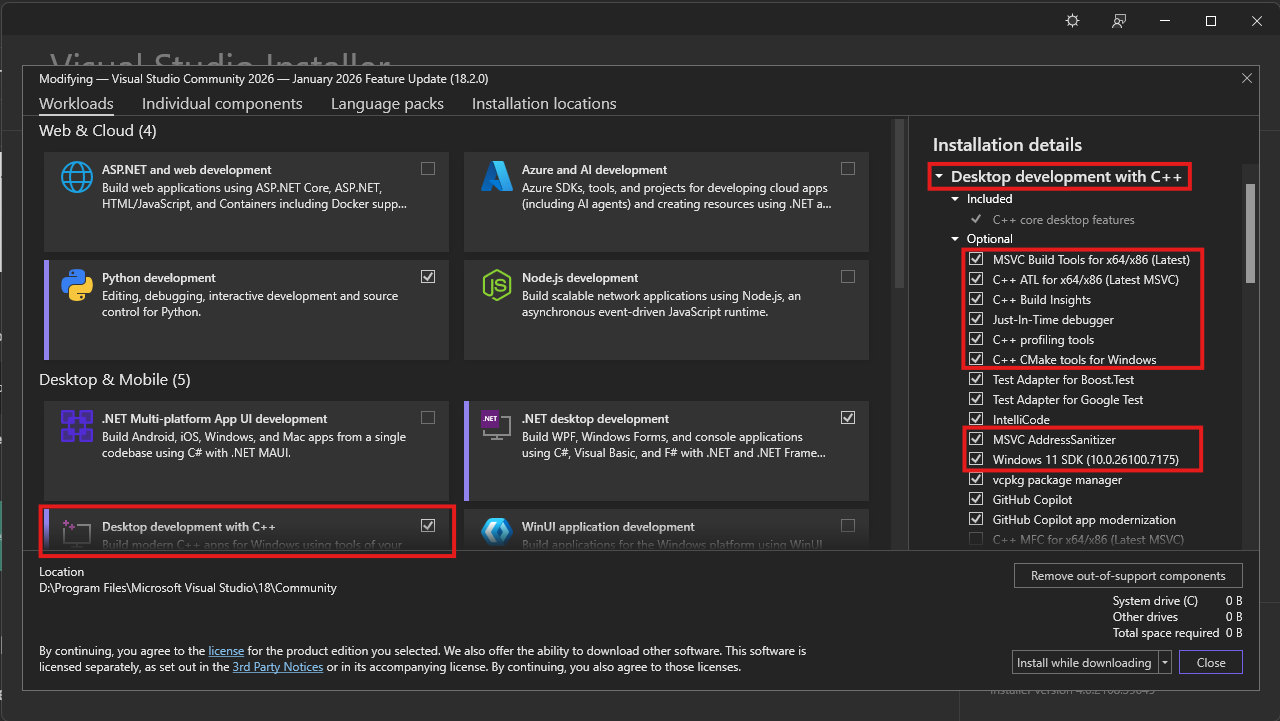
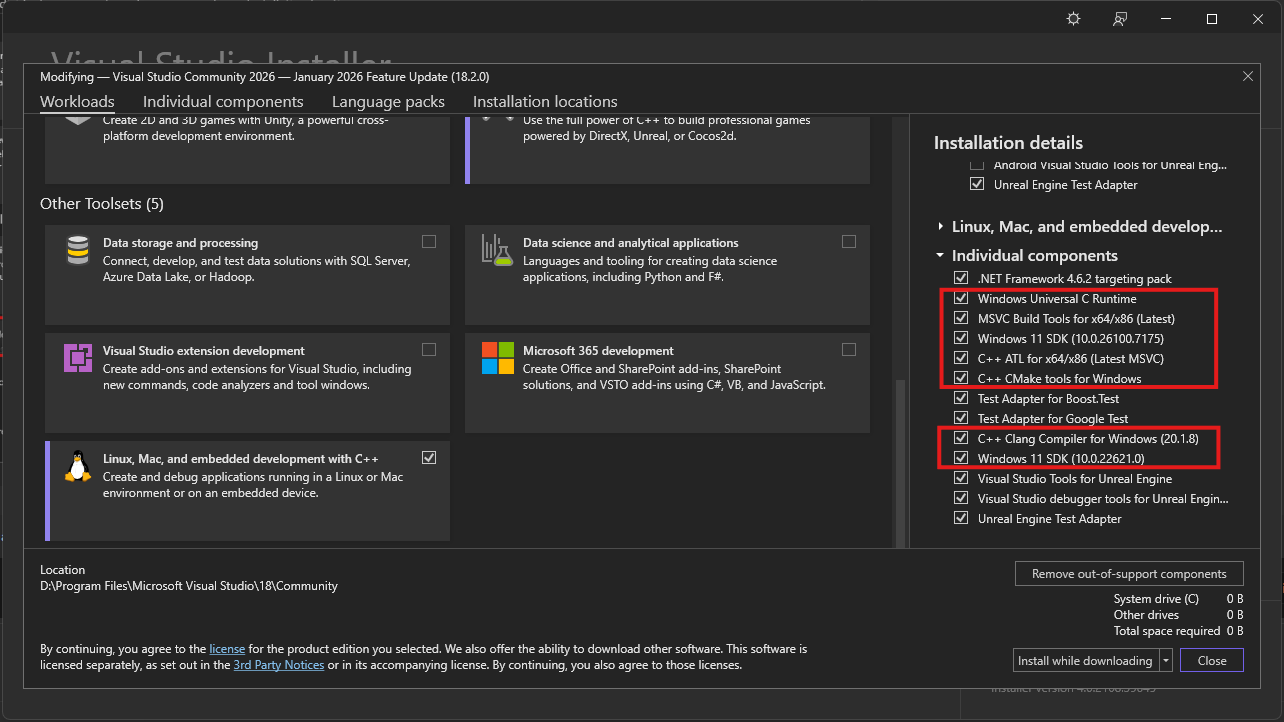
Make sure you have installed these packages with Visual Studio Installer in order to compile C++ codebases:
Packages
>
>
>
> 
>
> 
>
> **Note**: **Windows 11 SDK**'s can be replaced by **Windows 10 SDK**'s, but it is recommended to install one of them.
>
>
>
### ⬇️ Obtaining the Client Source
To build the source for the first time, you first need to clone it. In your command prompt, `cd` into your desired location or create a new folder wherever you want and download the project using `Git`.
Here's how
>
>
>
>
> Open up your terminal inside or `cd` into your desired folder and type this command:
>
> ```
> git clone https://github.com/d1str4ught/m2dev-client-src.git
> ```
>
>
>
> ### ✅ You have successfully obtained the Client Source project!
>
>
>
### 🛠️ Building the Source Code
Building the project is extremely simple, if all Visual Studio components are being installed correctly.
Instructions
>
>
>
> Open up your terminal inside, or `cd` in your project's root working directory and initialize the build with this command:
>
> ```
> cmake -S . -B build
> ```
>
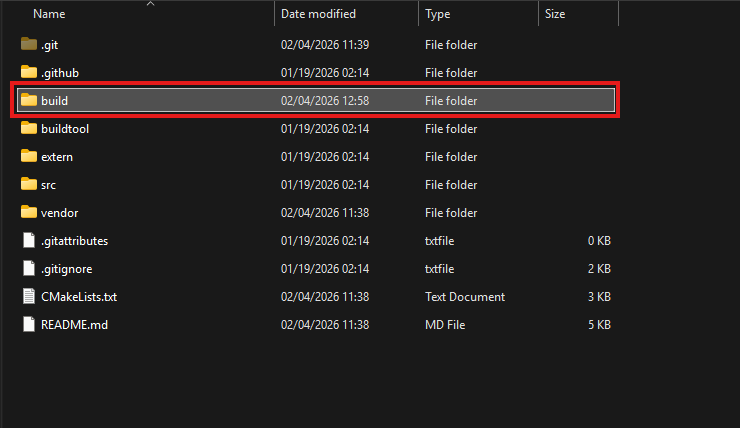
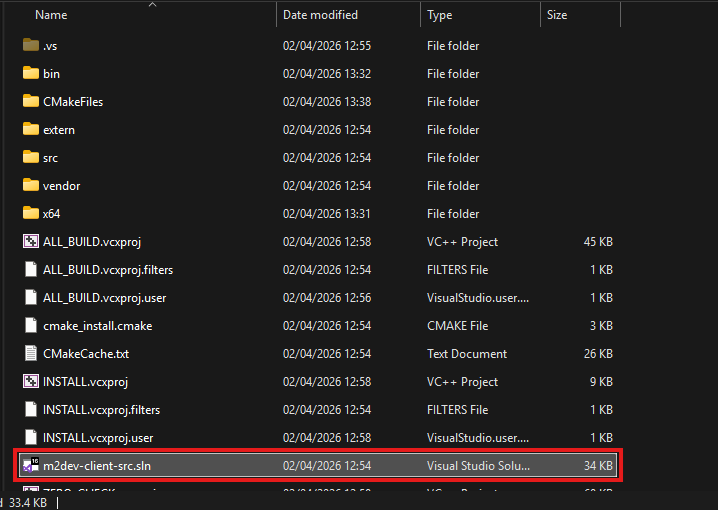
> A new `build` folder has been created in your project's root directory. This folder contains all the build files and configurations, along with the `sln` file to open the project in Visual Studio.
>
> 
>
> 
>
> Double click on that file to launch Visual Studio and load the project.
>
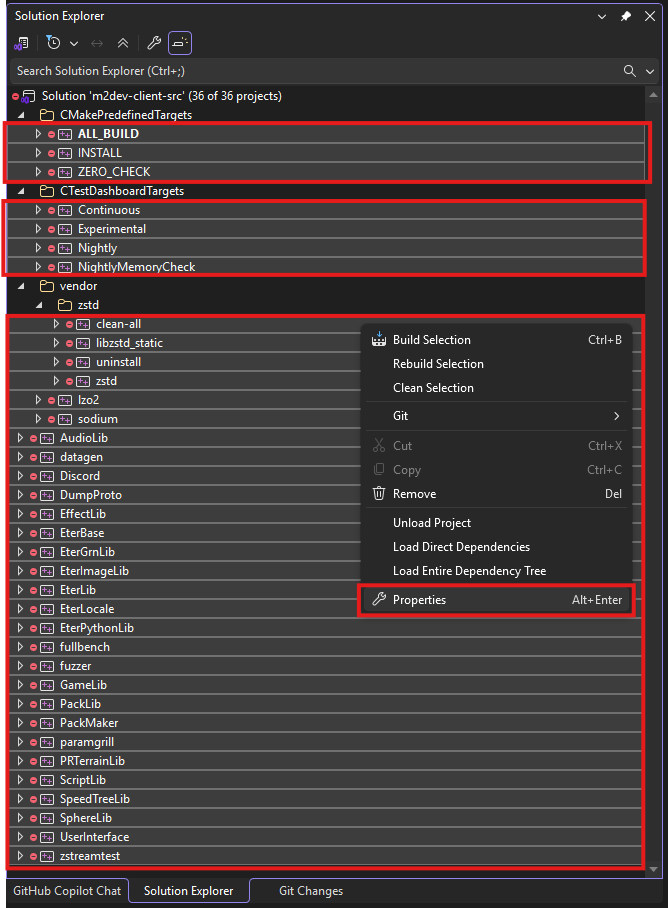
> In the Solution Explorer, select all the projects minus the container folders, right click on one of the selected items, and click **Properties**
>
> 
>
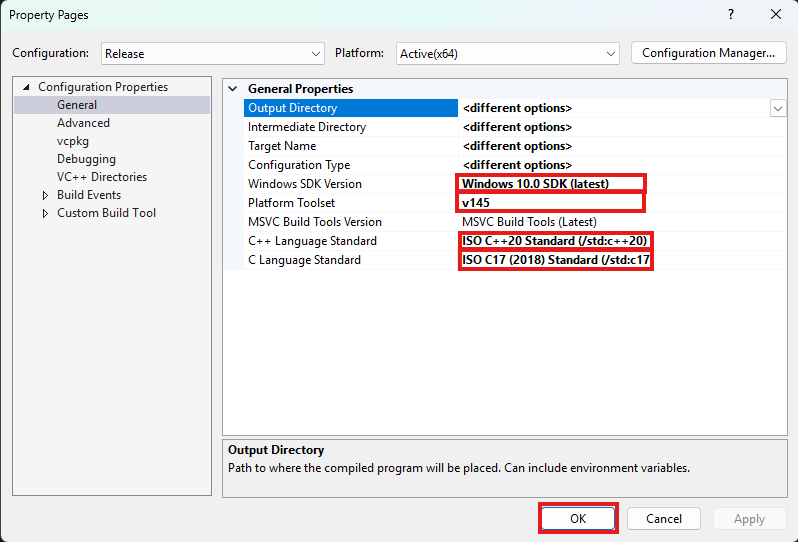
> Next, make sure that the following settings are adjusted like this:
>
> 1. **Windows SDK Version** should be the latest of Windows 10. It is not recommended to select any Windows 11 versions yet if avalable.
> 2. **Platform Toolset** is the most important part for your build to succeed! Select the highest number you see. **v145** is for Visual Studio 2026. If you are running Visual Studio 2022 you won't have that, you will have **v143**, select that one, same goes for older Visual Studio versions.
> 3. **C++ Language Standard** should be C++20 as it is the new standard defined in the CMakeList.txt files as well. Might as well set it like that for all dependencies.
> 4. **C Language Standard** should be C17 as it is the new standard defined in the CMakeList.txt files as well. Might as well set it like that for all dependencies.
>
> Once done, click Apply and then OK to close this dialog.
>
> 
>
> After that, in the toolbar at the top of the window, select your desired output configuration:
>
> 
>
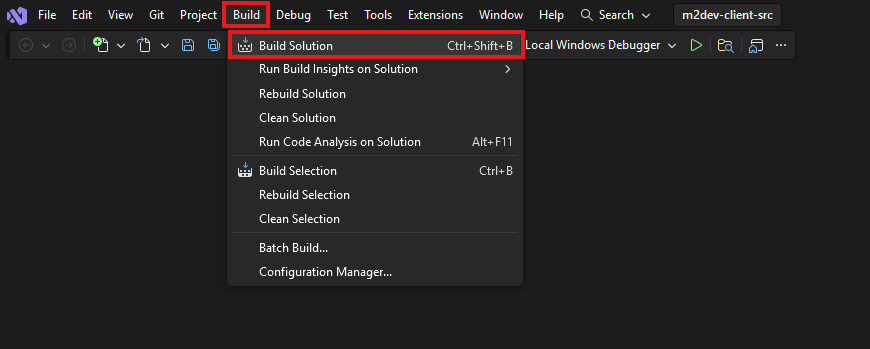
> Finally, click on the **Build** option at the top and select **Build Solution**, or simply press **CTRL+SHIFT+B** in your keyboard with all the projects selected.
>
> 
>
> **Note**: if this is **NOT** your first build after executing the `cmake -S . -B build` command for this workspace, it is recommended to click **Clean Solution** before **Build Solution**.
>
>
>
> Where to find your compiled binaries:
>
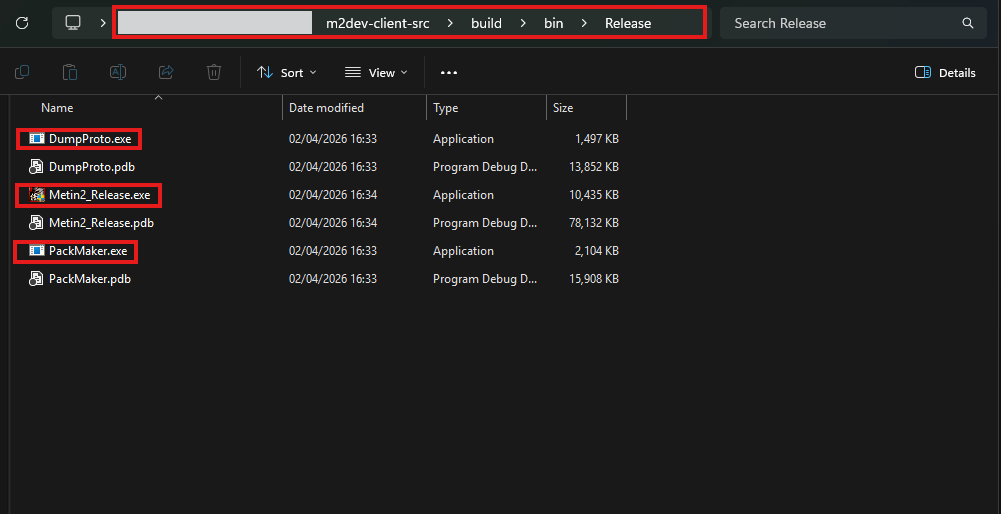
> Inside the **build** folder in your cloned repository, you should have a **bin** folder and inside that, you should have a **Debug**, **Release**, **RelWithDebInfo** or **MinSizeRel** folder, depending on your build configuration selection.
>
> In that folder you should be seeing all your binaries:
>
> 
>
> If you did **NOT** install the **Client** project yet, you are done here.
>
> If you **HAVE** the **Client** project installed, paste these 2 `.exe` files in these locations inside the Server project:
>
> - **Metin2_.exe**: inside root folder of the Client project
> - **PackMaker.exe**: inside `assets\PackMaker.exe`
>
>
>
> ### ✅ You have successfully built the Client Source!
>
>
>
---
## 🔥 The Client Source part of the guide is complete!
## Next steps
You should now be finally ready to proceed to [Client project](https://github.com/d1str4ught/m2dev-client) packing and entering the game for the first time!
⭐ **NEW**: We are now on Discord, feel free to [check us out](https://discord.gg/ETnBChu2Ca)!