forked from metin-server/m2dev-client-src

245 lines
9.2 KiB
Markdown
245 lines
9.2 KiB
Markdown
# M2Dev Client Source
|
|
|
|
[](https://github.com/d1str4ught/m2dev-client-src/actions/workflows/main.yml)
|
|
|
|
This repository contains the source code necessary to compile the game client executable.
|
|
|
|
## How to build (short version)
|
|
|
|
> cmake -S . -B build
|
|
>
|
|
> cmake --build build
|
|
|
|
**For more installation/configuration, check out the [instructions](#installationconfiguration) below.**
|
|
|
|
---
|
|
|
|
## 📋 Changelog
|
|
|
|
### ⬆️ Feature Improvements
|
|
- **Packet dump has its own log file**: The debug process now generates 4 log files:
|
|
- `log.txt`: What you know and love, minus packet dumps
|
|
- `syserr.txt`: What you know and hate to see, as you know and hate it!
|
|
- `packetdump.txt`: All packet dumps go here
|
|
- `pdlog.txt`: The complete log with everything included
|
|
- **Console outputs are now colored!**: Not a big difference, red for syserr outputs, dimmer color for packet dumps.
|
|
- **TempTrace**: A type of output made to stand out in the console! Made to be used as a temporary debugging helper, it has blue background so you can easily spot it in the console. It logs normally in files and it is exported to the Python system via the C++ API!
|
|
Available C++ calls:
|
|
- `TraceTemp`
|
|
- `TraceTempf`
|
|
- `TraceTempn`
|
|
- `TraceTempfn`
|
|
Available Python calls:
|
|
- `TempTrace`
|
|
Usage: same as `Trace(f/n/fn)`, and `ErrorTrace` for Python
|
|
|
|
<br>
|
|
<br>
|
|
|
|
---
|
|
|
|
<br>
|
|
<br>
|
|
|
|
# Installation/Configuration
|
|
This is the third part of the entire project and it's about the client binary, the executable of the game.
|
|
|
|
Below you will find a comprehensive guide on how to configure all the necessary components from scratch.
|
|
|
|
This guide is made using a **Windows** environment as the main environment and **cannot work in non-Windows operating systems!**
|
|
|
|
This guide also uses the latest versions for all software demonstrated as of its creation date at February 4, 2026.
|
|
|
|
© All copyrights reserved to the owners/developers of any third party software demonstrated in this guide other than this project/group of projects.
|
|
|
|
<br>
|
|
|
|
### 📋 Order of projects configuration
|
|
If one or more of the previous items is not yet configured please come back to this section after you complete their configuration steps.
|
|
|
|
> - ✅ [M2Dev Server Source](https://github.com/d1str4ught/m2dev-server-src)
|
|
> - ✅ [M2Dev Server](https://github.com/d1str4ught/m2dev-server)
|
|
> - ▶️ [M2Dev Client Source](https://github.com/d1str4ught/m2dev-client-src) [**YOU ARE HERE**]
|
|
> - ⏳ [M2Dev Client](https://github.com/d1str4ught/m2dev-client) [**ALSO CONTAINS ADDITIONAL INFORMATION FOR POST-INSTALLATION STEPS**]
|
|
|
|
<br>
|
|
|
|
### 🧱 Software Prerequisites
|
|
|
|
<details>
|
|
<summary>
|
|
Please make sure that you have installed the following software in your machine before continuing:
|
|
</summary>
|
|
|
|
<br>
|
|
|
|
> <br>
|
|
>
|
|
> -  **Visual Studio**: The software used to edit and compile the source code. [Download](https://visualstudio.microsoft.com/vs/)
|
|
>
|
|
> -  **Visual Studio Code (VS Code)**: A lighter alternative to Visual Studio, harder to build the project in this software but it is recommended for code editing. [Download](https://code.visualstudio.com/Download)
|
|
> -  **Git**: Used to clone the repositories in your Windows machine. [Download](https://git-scm.com/install/windows)
|
|
> -  **CMake**: Required for setting up and configuring the build of the source code. [Download](https://git-scm.com/install/windows)
|
|
> -  **Notepad++ (optional but recommended)**: Helps with quick, last minute edits. [Download](https://notepad-plus-plus.org/downloads/)
|
|
>
|
|
> <br>
|
|
>
|
|
|
|
</details>
|
|
|
|
<br>
|
|
|
|
### 👁️ Required Visual Studio packages
|
|
|
|
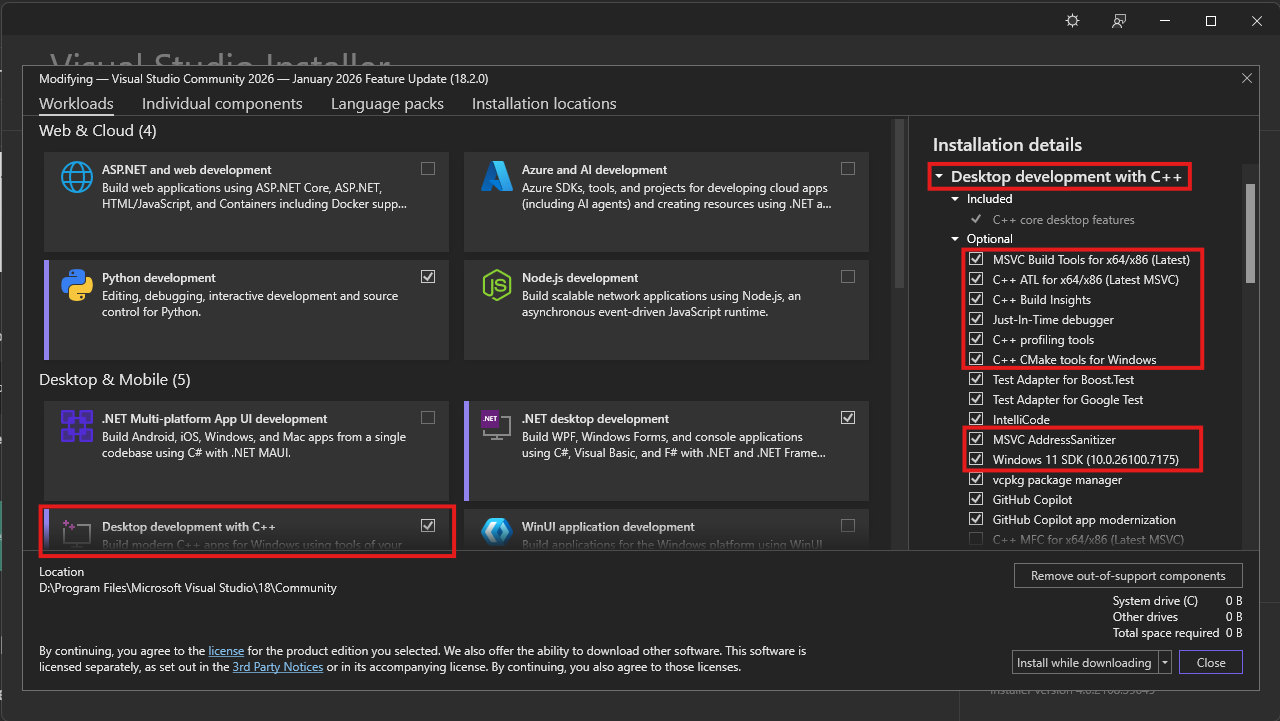
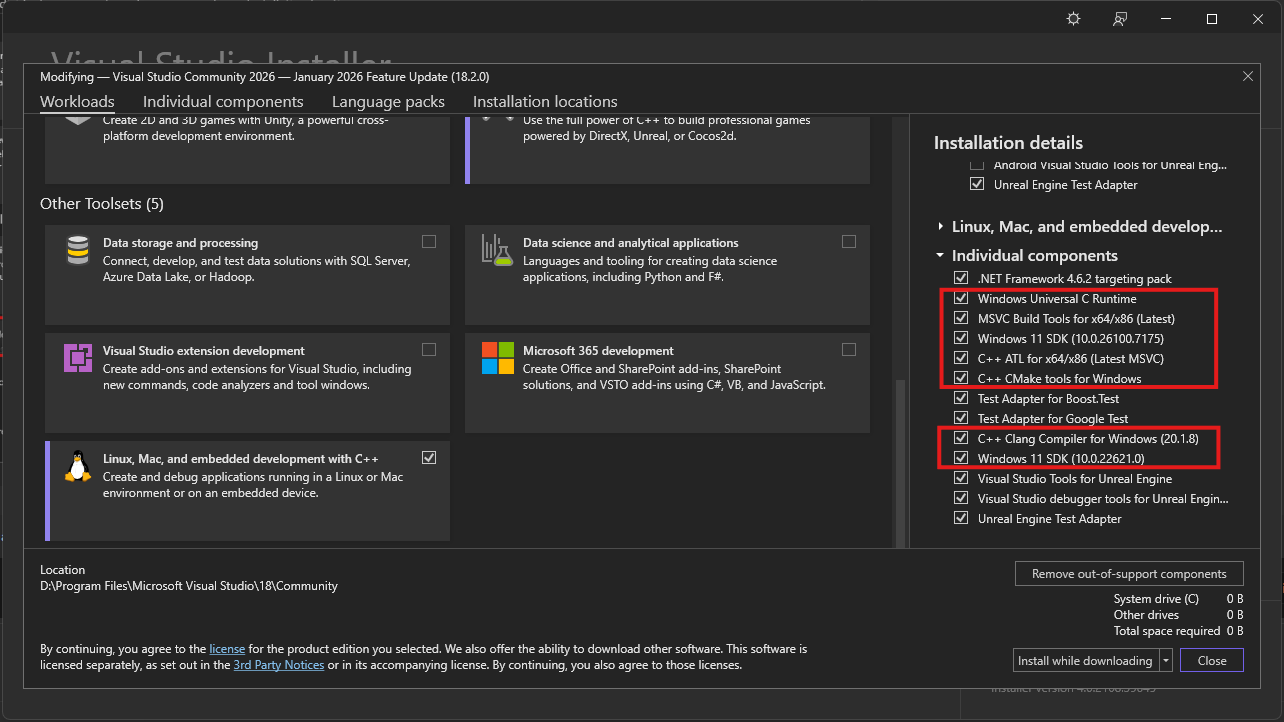
Make sure you have installed these packages with Visual Studio Installer in order to compile C++ codebases:
|
|
|
|
<details>
|
|
<summary>
|
|
Packages
|
|
</summary>
|
|
|
|
<br>
|
|
|
|
>
|
|
> <br>
|
|
>
|
|
> 
|
|
>
|
|
> 
|
|
>
|
|
> **Note**: **Windows 11 SDK**'s can be replaced by **Windows 10 SDK**'s, but it is recommended to install one of them.
|
|
>
|
|
> <br>
|
|
>
|
|
</details>
|
|
|
|
<br>
|
|
|
|
|
|
### ⬇️ Obtaining the Client Source
|
|
|
|
To build the source for the first time, you first need to clone it. In your command prompt, `cd` into your desired location or create a new folder wherever you want and download the project using `Git`.
|
|
|
|
<details>
|
|
<summary>
|
|
Here's how
|
|
</summary>
|
|
|
|
<br>
|
|
|
|
>
|
|
> <br>
|
|
>
|
|
>
|
|
> Open up your terminal inside or `cd` into your desired folder and type this command:
|
|
>
|
|
> ```
|
|
> git clone https://github.com/d1str4ught/m2dev-client-src.git
|
|
> ```
|
|
>
|
|
> <br>
|
|
>
|
|
> ### ✅ You have successfully obtained the Client Source project!
|
|
>
|
|
> <br>
|
|
>
|
|
</details>
|
|
|
|
<br>
|
|
|
|
### 🛠️ Building the Source Code
|
|
|
|
Building the project is extremely simple, if all Visual Studio components are being installed correctly.
|
|
|
|
<details>
|
|
<summary>
|
|
Instructions
|
|
</summary>
|
|
|
|
<br>
|
|
|
|
>
|
|
> <br>
|
|
>
|
|
> Open up your terminal inside, or `cd` in your project's root working directory and initialize the build with this command:
|
|
>
|
|
> ```
|
|
> cmake -S . -B build
|
|
> ```
|
|
>
|
|
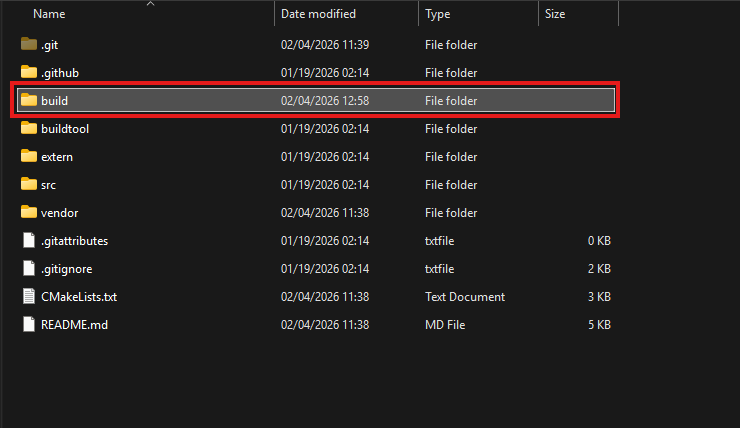
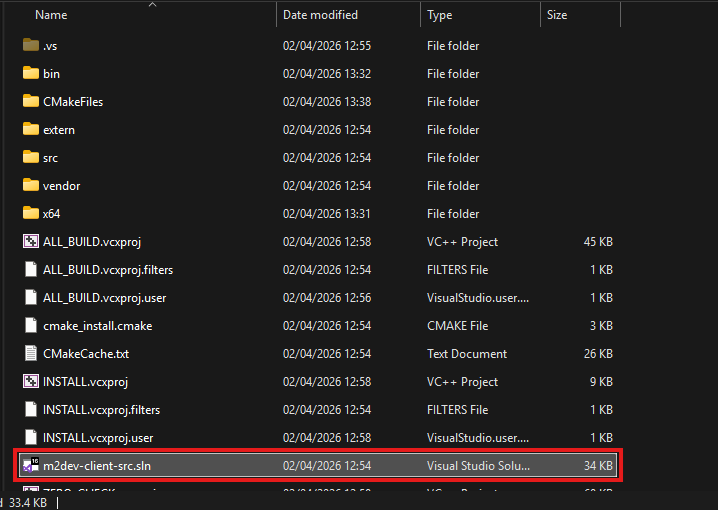
> A new `build` folder has been created in your project's root directory. This folder contains all the build files and configurations, along with the `sln` file to open the project in Visual Studio.
|
|
>
|
|
> 
|
|
>
|
|
> 
|
|
>
|
|
> Double click on that file to launch Visual Studio and load the project.
|
|
>
|
|
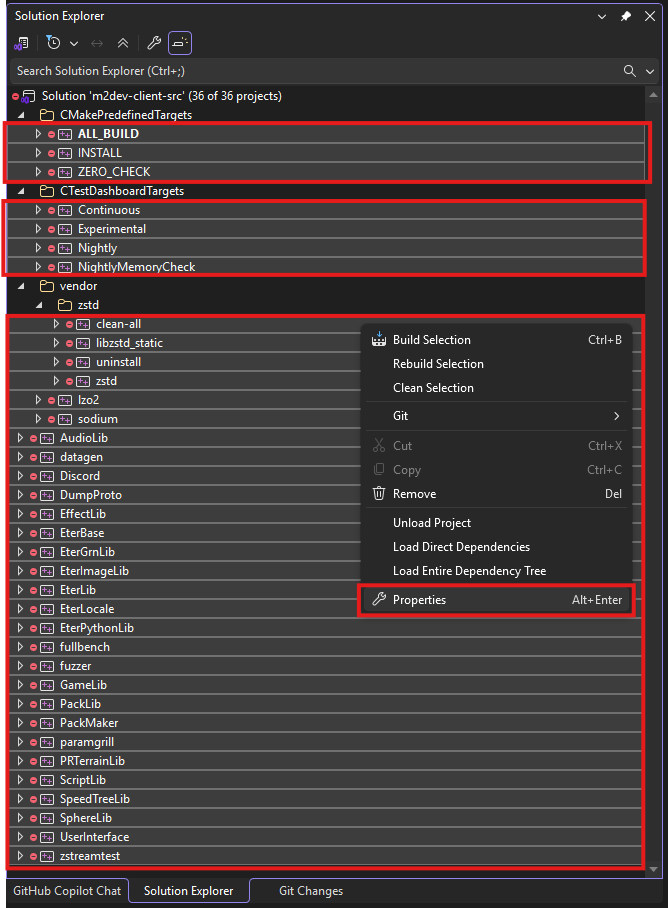
> In the Solution Explorer, select all the projects minus the container folders, right click on one of the selected items, and click **Properties**
|
|
>
|
|
> 
|
|
>
|
|
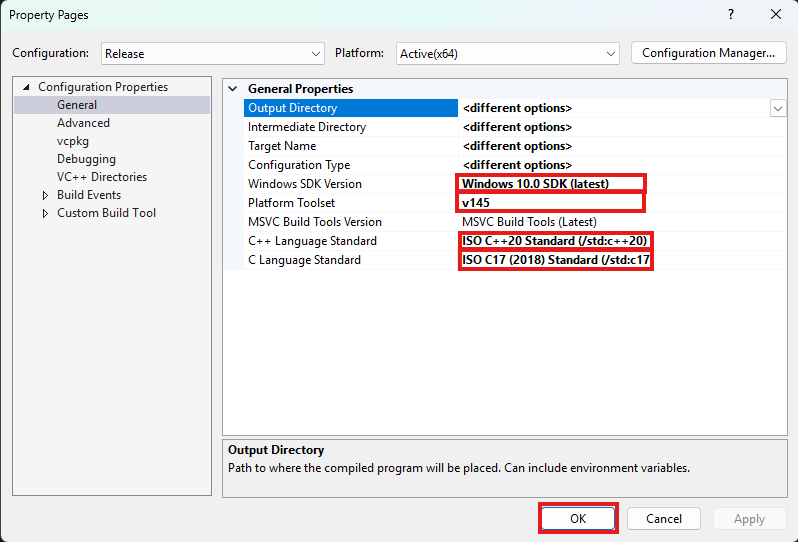
> Next, make sure that the following settings are adjusted like this:
|
|
>
|
|
> 1. **Windows SDK Version** should be the latest of Windows 10. It is not recommended to select any Windows 11 versions yet if avalable.
|
|
> 2. **Platform Toolset** is the most important part for your build to succeed! Select the highest number you see. **v145** is for Visual Studio 2026. If you are running Visual Studio 2022 you won't have that, you will have **v143**, select that one, same goes for older Visual Studio versions.
|
|
> 3. **C++ Language Standard** should be C++20 as it is the new standard defined in the CMakeList.txt files as well. Might as well set it like that for all dependencies.
|
|
> 4. **C Language Standard** should be C17 as it is the new standard defined in the CMakeList.txt files as well. Might as well set it like that for all dependencies.
|
|
>
|
|
> Once done, click Apply and then OK to close this dialog.
|
|
>
|
|
> 
|
|
>
|
|
> After that, in the toolbar at the top of the window, select your desired output configuration:
|
|
>
|
|
> 
|
|
>
|
|
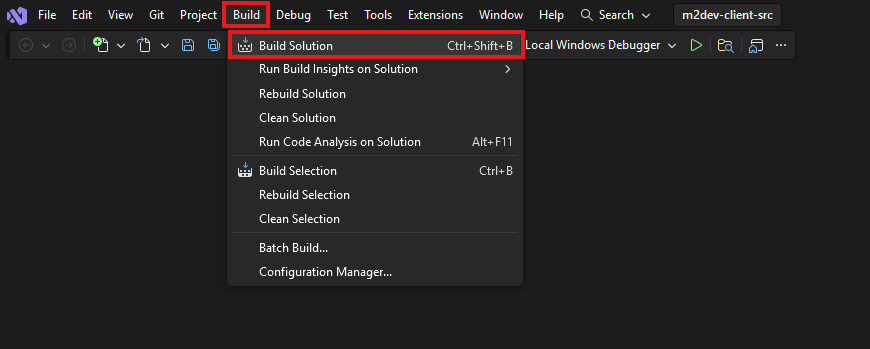
> Finally, click on the **Build** option at the top and select **Build Solution**, or simply press **CTRL+SHIFT+B** in your keyboard with all the projects selected.
|
|
>
|
|
> 
|
|
>
|
|
> **Note**: if this is **NOT** your first build after executing the `cmake -S . -B build` command for this workspace, it is recommended to click **Clean Solution** before **Build Solution**.
|
|
>
|
|
> <br>
|
|
>
|
|
> Where to find your compiled binaries:
|
|
>
|
|
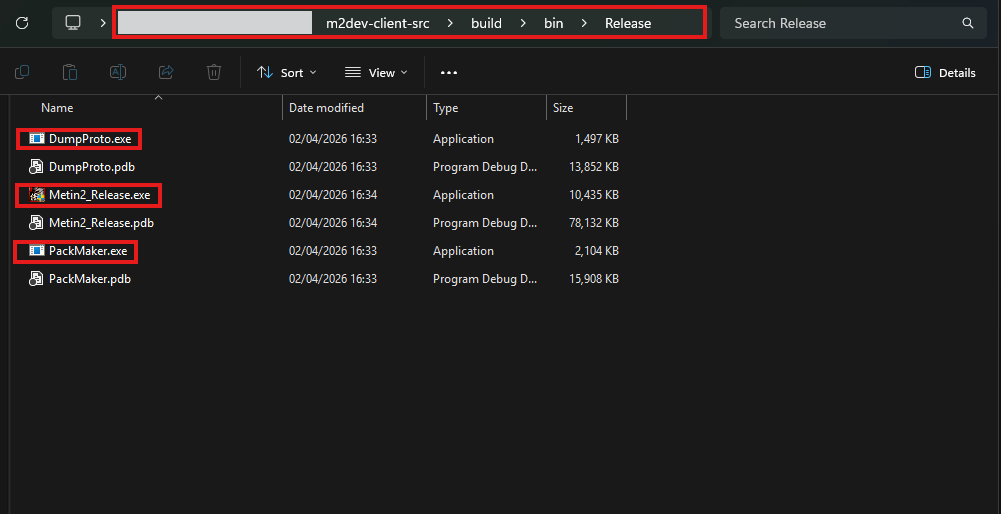
> Inside the **build** folder in your cloned repository, you should have a **bin** folder and inside that, you should have a **Debug**, **Release**, **RelWithDebInfo** or **MinSizeRel** folder, depending on your build configuration selection.
|
|
>
|
|
> In that folder you should be seeing all your binaries:
|
|
>
|
|
> 
|
|
>
|
|
> If you did **NOT** install the **Client** project yet, you are done here.
|
|
>
|
|
> If you **HAVE** the **Client** project installed, paste these 2 `.exe` files in these locations inside the Server project:
|
|
>
|
|
> - **Metin2_<Debug|Release|RelWithDebInfo|MinSizeRel>.exe**: inside root folder of the Client project
|
|
> - **PackMaker.exe**: inside `assets\PackMaker.exe`
|
|
>
|
|
> <br>
|
|
>
|
|
> ### ✅ You have successfully built the Client Source!
|
|
>
|
|
> <br>
|
|
>
|
|
</details>
|
|
|
|
<br>
|
|
<br>
|
|
|
|
---
|
|
|
|
<br>
|
|
<br>
|
|
|
|
## 🔥 The Client Source part of the guide is complete!
|
|
|
|
<br>
|
|
<br>
|
|
|
|
## Next steps
|
|
You should now be finally ready to proceed to [Client project](https://github.com/d1str4ught/m2dev-client) packing and entering the game for the first time!
|
|
|
|
⭐ **NEW**: We are now on Discord, feel free to [check us out](https://discord.gg/ETnBChu2Ca)!
|